Facebook Ads are one of the most powerful tools in the digital marketer’s toolbox. With its ability to reach billions of users and target specific audiences based on interests, demographics, and behaviors, Facebook offers a platform where businesses can generate leads, increase brand awareness, and drive sales. But how do you create Facebook ads that convert? Here’s a step-by-step guide to help you get started.
Step 1: Set Clear Objectives
Before diving into the creative process, it’s essential to define your advertising goals. Facebook Ads Manager provides various objectives such as:
- Awareness: Increasing your brand’s reach and visibility.
- Consideration: Driving traffic, engagement, app installs, or lead generation.
- Conversions: Encouraging users to take specific actions, like purchasing a product or signing up for a service.
Your objective should align with your broader marketing goals. For example, if you’re launching a new product, your objective might be brand awareness. If you’re running a sale, you might focus on conversions.
Step 2: Know Your Audience
One of Facebook’s biggest advantages is its targeting capabilities. The more specific you are, the better. Facebook allows you to create custom audiences based on:
- Demographics: Age, gender, education, job title, relationship status.
- Location: Country, city, or even zip code.
- Interests: Pages people have liked, their hobbies, or their favorite activities.
- Behavior: Purchase behavior, device usage, and more.
You can also upload your customer lists, target people who have visited your website or create lookalike audiences based on your best customers. This precise targeting ensures your ads are shown to the people most likely to convert.
Step 3: Craft Compelling Copy
Your ad copy needs to grab attention quickly. Whether it’s a video ad, carousel ad, or single image ad, users are bombarded with content, so your message needs to stand out. Here’s how to craft winning copy:
- Keep It Simple: Aim for clarity over cleverness. People scroll through Facebook quickly, so make your message clear and to the point.
- Highlight Benefits: Focus on how your product or service solves a problem or improves the customer’s life.
- Include a Clear Call-to-Action (CTA): Whether it’s “Shop Now,” “Learn More,” or “Download,” your CTA should tell users exactly what to do next.
- Use Emotion: Emotional triggers can be powerful in marketing. Think about how your product makes people feel and incorporate that into your messaging.
Step 4: Choose the Right Visuals
Facebook is a visual platform, so your ad creative is just as important as your copy. Use high-quality images or videos that align with your brand and resonate with your target audience. Here are some tips:
- Bright Colors and Contrasts: Use bold, eye-catching colors to stand out in the feed.
- Consistency with Brand: Make sure your ads reflect your brand’s visual identity and tone.
- Test Different Formats: Facebook offers a variety of ad formats—image, video, slideshow, carousel, and more. Try different formats to see which works best for your audience.
Step 5: Set Your Budget and Schedule
Facebook allows for flexible budgeting. You can either set a daily budget or a lifetime budget (the amount you’re willing to spend over the entire campaign). Facebook will optimize your ad spend based on the objective you selected.
It’s also important to decide when you want your ads to run. You can choose to run your ads continuously or schedule them to appear only during certain times of the day or week when your audience is most active.
Step 6: Optimize for Mobile
Most Facebook users access the platform via their mobile devices. This means your ads need to be optimized for smaller screens. Here’s how:
- Shorter Headlines: Get your message across quickly. Long headlines might get cut off on mobile.
- Vertical or Square Images: These perform better on mobile than horizontal ones because they take up more screen space.
- Fast-Loading Landing Pages: If your landing page takes too long to load on mobile, you’ll lose potential customers.
Step 7: Set Up Conversion Tracking
To measure the success of your Facebook ads, you need to track conversions. Facebook’s Pixel is a piece of code you can add to your website to track user actions. It allows you to:
- Measure the effectiveness of your ads.
- Track conversions like purchases, sign-ups, or form submissions.
- Retarget users who visited your site but didn’t convert.
Without tracking, you’re essentially running ads in the dark. Make sure to set up Facebook Pixel for accurate reporting and to optimize future campaigns.
Step 8: A/B Test Your Ads
Even the best marketers can’t predict with 100% certainty what will work best. That’s where A/B testing comes in. Try different versions of your ad to see what resonates more with your audience. Test different:
- Headlines
- Images or videos
- Ad copy
- CTAs
- Audience targeting
By running these tests, you can determine which combinations perform best and allocate your budget to the highest-performing ads.
Step 9: Monitor and Adjust Your Campaign
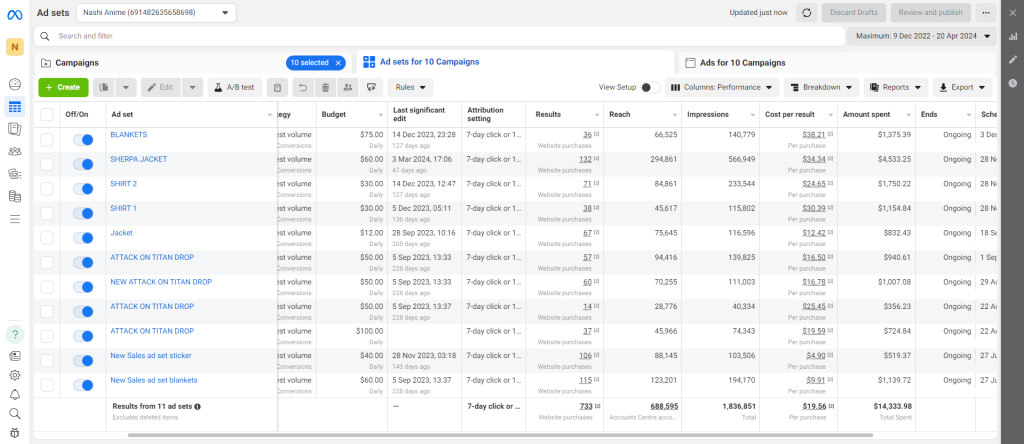
Once your campaign is live, you should closely monitor its performance in the Facebook Ads Manager. Key metrics to track include:
- Click-Through Rate (CTR): The percentage of users who clicked on your ad after seeing it.
- Cost Per Click (CPC): How much you’re paying for each click.
- Conversion Rate: The percentage of people who completed the desired action after clicking the ad.
- Return on Ad Spend (ROAS): This measures how much revenue you generate for every advertising dollar.
If something isn’t working, don’t be afraid to make adjustments. You might need to tweak your audience, creative, or bidding strategy.
Conclusion
Creating Facebook ads that convert takes a mix of creativity, strategy, and continuous optimization. By setting clear objectives, understanding your audience, crafting compelling copy and visuals, and tracking performance, you can create ads that drive real results for your business. Remember, the key to success is testing and adapting—stay flexible, and keep experimenting to discover what works best for your brand.